Best Smart Home Devices For Seniors: 12 Easy Upgrades That Make Aging In Place Safer
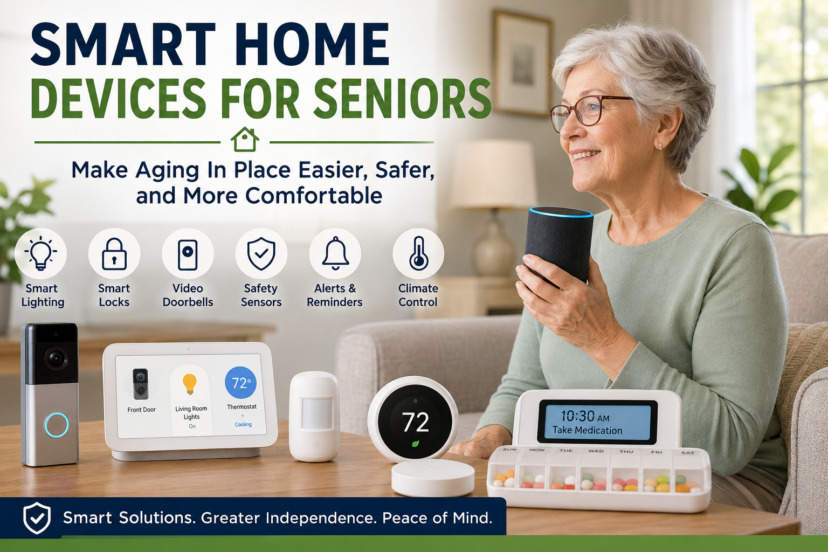
A safer home does not always require a major renovation. Sometimes, a few well-chosen devices can make everyday tasks easier, reduce common household risks, and give both older adults and their families greater peace of mind. Today’s best smart home devices for seniors can turn on lights automatically, remind someone to lock a door, adjust the thermostat without getting up, detect possible emergencies, and make it easier to communicate with family members. Many are affordable and can be installed without changing the basic layout of the home.
More importantly, smart technology can support independence rather than replace it. The goal is not to fill a house with complicated gadgets. It is to identify everyday frustrations or safety concerns and use simple technology to solve them.
Whether you are preparing your own home for the years ahead or helping an aging parent, starting small can create a home that feels safer, easier, and more comfortable.
⭐ Quick Answer: Best Smart Home Devices For Seniors
The most useful smart home devices for seniors are those that solve a specific everyday problem. Smart lights can reduce nighttime fall risks, video doorbells improve awareness at the front door, smart speakers simplify everyday tasks, and automatic thermostats improve comfort. Medical alert systems, water leak sensors, smart locks, and medication reminders can provide additional safety and independence depending on individual needs.
Key Takeaways
- Most likely cause: Everyday challenges such as poor lighting, limited mobility, forgotten tasks, difficult-to-reach controls, and concerns about household emergencies can make independent living harder.
- Usually serious? Not always, but small household difficulties can become important safety concerns when they increase fall risks or make it difficult to respond to an emergency.
- First thing to check: Identify the two or three daily activities that are currently the most difficult, inconvenient, or potentially unsafe.
- Best solution: Choose the best smart home devices for seniors that directly address those problems while remaining simple enough for the older adult to use comfortably.
🏠 Why Smart Home Technology Can Make Aging In Place Easier
Technology is most valuable when you barely notice it.
For example, walking through a dark hallway to reach a light switch may become more difficult with age. A motion-activated smart light can remove that problem automatically.
Someone with arthritis may find small thermostat buttons frustrating. A voice-controlled thermostat can make temperature adjustments easier.
The same principle applies throughout the home. Rather than buying technology simply because it is available, look for recurring problems and match each problem with a practical solution.
The best aging-in-place technology can help with:
- Lighting And Visibility
- Home Security
- Communication
- Temperature Control
- Medication Routines
- Emergency Assistance
- Household Maintenance
- Daily Reminders
This approach keeps the home simple while providing useful support where it matters most.
💡 1. Smart Lights And Motion-Activated Lighting
Good lighting is one of the simplest ways to make a home easier to navigate.
Smart bulbs, switches, plugs, and motion sensors can automatically illuminate hallways, bathrooms, stairs, and bedrooms. This can be particularly useful during nighttime trips to the bathroom.
Consider automatic lighting near:
- Bedrooms
- Hallways
- Bathrooms
- Staircases
- Entryways
- Kitchens
Voice-controlled lights can also help someone avoid reaching for difficult switches or walking across a dark room.
For many families, lighting is one of the easiest smart home devices for seniors to introduce because the benefits are immediate and the technology can work automatically.
🚪 2. Video Doorbells
Answering the door can be challenging for someone with limited mobility.
A video doorbell allows a resident to see and often speak with visitors using a smartphone, tablet, or compatible smart display.
This can help older adults identify delivery drivers, visitors, or unfamiliar people without immediately opening the door.
Look for systems with large, easy-to-read notifications and straightforward controls. Complicated apps can undermine the convenience you are trying to create.
🔐 3. Smart Door Locks
Traditional keys can become inconvenient when dexterity, vision, or memory changes.
Smart locks may allow doors to be unlocked using a keypad, smartphone, fingerprint, or other access method, depending on the model.
They can also make it easier to provide temporary access to trusted relatives or caregivers without hiding spare keys outside.
However, every household should maintain a reliable backup entry method in case of a dead battery, phone problem, or technology failure.
🗣️ 4. Smart Speakers And Voice Assistants
A smart speaker can become a simple hands-free household assistant.
Depending on the system and setup, an older adult may be able to use voice commands to:
- Set reminders.
- Make shopping lists.
- Play music.
- Check the weather.
- Control compatible lights.
- Adjust a connected thermostat.
- Set timers.
- Call supported contacts.
The advantage is accessibility. Instead of navigating small menus or multiple apps, the user can simply speak.
When selecting smart home technology for older adults, prioritize systems that require as few steps as possible.
🌡️ 5. Smart Thermostats
Maintaining a comfortable indoor temperature can become increasingly important as we age.
A smart thermostat can automatically follow a schedule, maintain consistent temperatures, and reduce the need to repeatedly adjust wall controls.
Some systems also allow trusted family members to monitor or change settings remotely when permission is provided.
Avoid creating overly complicated schedules. A few dependable temperature settings are usually more useful than constant automated changes.
🚨 6. Medical Alert Systems
Medical alert systems are different from ordinary smart home gadgets because they are specifically designed to help users request assistance.
Depending on the service, features may include wearable help buttons, two-way communication, caregiver notifications, GPS capabilities, or automatic fall detection.
Not every older adult needs a medical alert system. However, it may be worth discussing when someone lives alone, has significant mobility limitations, has experienced falls, or has difficulty reaching a phone during an emergency.
Fall-detection technology should supplement—not replace—basic fall-prevention strategies.
💧 7. Smart Water Leak Sensors
A small plumbing leak can become a major household problem if nobody notices it.
Compact water sensors can be placed near washing machines, water heaters, toilets, sinks, refrigerators, and other potential leak locations.
When moisture is detected, many models sound an alarm or send a notification.
Some advanced systems can even work with automatic water shutoff equipment.
These sensors can be especially helpful for older adults who have difficulty frequently checking basements, utility rooms, or areas underneath appliances.
🔥 8. Connected Smoke And Carbon Monoxide Alarms
Smoke and carbon monoxide alarms are essential home safety equipment regardless of age.
Connected models may provide additional alerts through compatible phones or devices, depending on the system.
However, smart features should never become a substitute for properly installed, functioning alarms.
Follow manufacturer instructions and applicable local requirements for installation, testing, replacement, and alarm placement.
💊 9. Smart Medication Reminders
Remembering multiple medications can become complicated, particularly when prescriptions have different schedules.
Electronic pill dispensers and medication reminder devices may use alarms, lights, notifications, or timed compartments to make routines easier to follow.
Some systems can notify a designated caregiver when scheduled medication appears to have been missed.
Medication technology should support the medication plan established by the individual’s healthcare provider or pharmacist, not change it.
📹 10. Indoor Cameras And Remote Monitoring
Indoor cameras can provide reassurance in some households, but they require careful consideration.
Privacy and consent should come first.
Older adults should understand what is being monitored, who can access the footage, and why the system is being used.
For many families, less intrusive alternatives such as door sensors, smart lights, leak detectors, or voluntary check-in systems may provide sufficient reassurance without cameras.
Technology should support independence, not make someone feel watched inside their own home.
🔌 11. Smart Plugs
Smart plugs can turn ordinary electrical devices into remotely controlled or scheduled devices.
For example, they may help automatically switch off certain lamps or other appropriate appliances after a scheduled period.
They can also reduce the need to bend down behind furniture to reach difficult outlets.
Always follow the smart plug manufacturer’s electrical ratings and safety instructions. High-powered or heat-producing appliances should not be connected unless the manufacturer specifically states that the plug is appropriate for that use.
🪟 12. Smart Blinds And Automatic Shades
Opening heavy curtains or reaching awkward window controls can become difficult for someone with arthritis or limited mobility.
Motorized blinds and shades can be controlled using a remote, wall switch, app, or compatible voice assistant.
Although they tend to cost more than smart bulbs or plugs, they may be worthwhile in rooms where window coverings are difficult to reach.
Automatic schedules can also open shades during the morning and close them in the evening without requiring daily physical effort.
🛠️ How To Choose Smart Home Devices For Seniors
More technology does not automatically create a safer home.
Start by walking through the house and looking at everyday routines. Where does the person struggle? What requires unnecessary bending, reaching, walking, or remembering?
Then prioritize technology that removes those obstacles.
Keep The System Simple
Whenever possible, use devices that work together rather than requiring several unrelated apps.
Look For Automatic Features
Motion sensors and scheduled lighting can be particularly useful because they require little ongoing interaction.
Plan For Power Or Internet Outages
Ask what happens if Wi-Fi stops working, batteries die, or electricity goes out.
Important safety equipment should have appropriate backup options.
Protect Privacy
Use strong, unique passwords, enable available security updates, and carefully control who has access to cameras, locks, and monitoring systems.
Involve The Older Adult
Perhaps most importantly, the person living in the home should have a meaningful say in which technology is installed.
A device that feels confusing, intrusive, or frustrating is unlikely to improve independence.
❤️ Combine Technology With Basic Home Safety Improvements
Even the best smart home devices for seniors cannot correct every household hazard.
Technology works best when combined with simple aging-in-place improvements such as:
- Removing loose rugs and clutter.
- Keeping walking paths clear.
- Improving lighting.
- Adding secure handrails.
- Installing appropriate grab bars where needed.
- Keeping frequently used items within comfortable reach.
- Repairing uneven flooring.
- Using appropriate nonslip surfaces.
Sometimes a $15 night light or rearranged piece of furniture provides more benefit than an expensive smart system.
Focus on solving problems rather than collecting gadgets.
👷 When To Consult A Professional
Consider professional guidance when mobility limitations, repeated falls, significant vision changes, cognitive concerns, or major home modifications make safety decisions more complicated.
A certified aging-in-place specialist (CAPS), occupational therapist, qualified accessibility contractor, healthcare provider, or home accessibility professional can help evaluate individual needs.
Professional input is particularly valuable before changing bathrooms, entrances, stairs, ramps, electrical systems, or structural features. An occupational therapist may also help identify practical changes based on how an individual actually moves through and uses the home.
❓ Frequently Asked Questions About Best Smart Home Devices For Seniors
What Are The Best Smart Home Devices For Seniors?
Useful options include smart lighting, video doorbells, smart speakers, smart thermostats, leak detectors, medical alert systems, medication reminders, and smart locks. The best choice depends on the person’s specific needs.
What Smart Devices Can Help Seniors Living Alone?
Automatic lights, medical alert systems, smart speakers, video doorbells, leak sensors, connected alarms, and communication devices can all be useful. Prioritize systems that are simple and reliable.
Can Smart Home Technology Help Prevent Falls?
Technology cannot prevent every fall, but motion-activated lighting and voice-controlled devices may reduce unnecessary walking, reaching, or navigating in darkness. Traditional fall-prevention measures remain important.
Are Smart Speakers Easy For Older Adults To Use?
They can be. Voice controls may be easier than small buttons or complicated smartphone menus. Initial setup and practice with a few simple commands can make adoption easier.
Are Smart Home Devices Safe For Seniors?
They can be useful when properly selected and installed. Families should consider cybersecurity, privacy, reliability, electrical safety, backup power, and ease of use before relying on a device.
How Much Does It Cost To Create A Smart Home For An Older Adult?
You do not need to automate an entire house. Starting with a few smart bulbs, motion sensors, or smart plugs can keep costs relatively low. More advanced security, medical alert, motorized shade, or whole-home automation systems can cost considerably more.
What Is The Easiest Smart Home Upgrade To Start With?
Automatic lighting is often a practical starting point. A motion-activated light in a hallway, bedroom, bathroom, or near stairs can provide an immediate benefit without requiring the user to learn complicated technology.
🎯 Conclusion: Best Smart Home Devices For Seniors
Aging in place does not have to mean turning a familiar home into a complicated high-tech environment.
The best technology quietly makes everyday life easier.
Start with one problem: a dark hallway, a difficult thermostat, an inconvenient front door, or concern about a water leak. Solve that problem first, see how the new system works in daily life, and then decide whether another improvement would help.
Small changes can add up. With thoughtful planning, the best smart home devices for seniors can become part of a broader strategy to improve safety, reduce everyday stress, preserve independence, and help older adults enjoy their homes with greater confidence and comfort.
Disclaimer: This content is for general informational purposes only and is not a substitute for professional medical, healthcare, home safety, or accessibility advice. Follow applicable local building codes and manufacturer instructions. Consult qualified healthcare providers, contractors, occupational therapists, or certified aging-in-place specialists before making significant home modifications or beginning new exercise routines.
 Explore more:
- How To Help Aging Parents Stay At Home?
- What Is The Walk-In Tub Cost?
- Best Mobility Aids For Seniors